Chapter 04 produced a clickable prototype. Now make the functions behind its buttons work.
1. Build the Core First
We will keep using the retrieval-practice tool. This round turns the clickable prototype into a tool that supports a complete practice session. The diagram shows the order from choosing the scope to building, trying, and extending it. This remains a teaching example, not a deployed product.
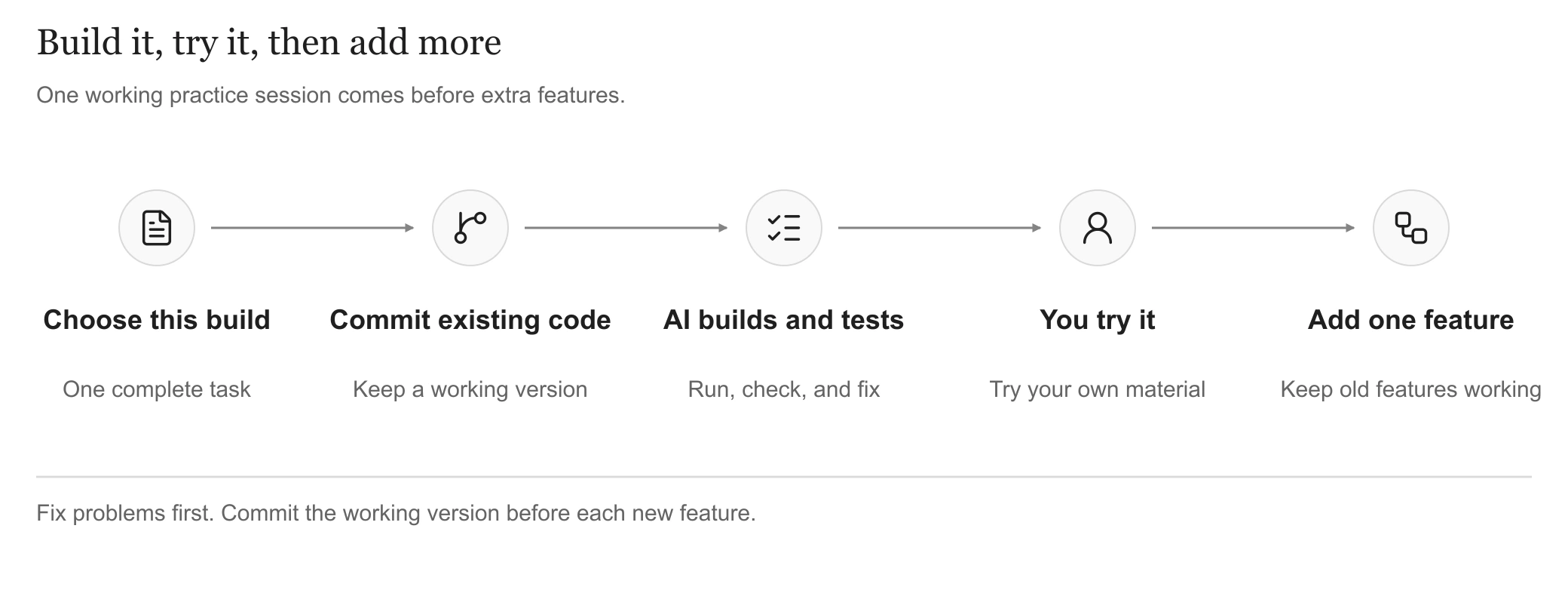
Choose the scope, commit existing code, then let the AI build and test. Try it before extending it. View full-size
The core for this round is these four actions:
Paste material → generate three questions → answer → review explanations and source.
Leave profiles, community features, payments, and cross-device history for later in this example. First answer: can someone use one piece of material to complete useful practice?
Keep the earlier decision: questions and answers remain in the current page, without guaranteed recovery after closing it. Add saved history when people need to return later. If private material from multiple users is central from day one, login and access controls cannot wait.
First give the AI the three resources you prepared so it understands this round's scope:
- Requirements: what this iteration includes and what can wait.
- Technical plan and interfaces: how frontend and backend work together and what inputs and results contain.
- UI prototype: layout, click behavior, and failure states.
Include existing code too. Ask the AI to raise unclear points and resolve them before proceeding. Once the scope is clear, prepare the project and commit existing changes before starting development.
2. Save Your Code First
The previous section established what to build. Now prepare to change the code. Make this a habit: before starting development, review and commit all previous changes to Git, then begin writing new code. An AI coding tool can change many files at once. Committing first gives you a clear version to return to if something breaks.
Prepare the project for your starting point:
- Existing project: start it once and confirm the current features work.
- Starting from scratch: ask the AI to use an official scaffold for directories and startup configuration, then confirm the base project starts.
If you will connect a model service, prepare its API key now and separate local configuration from files that belong in Git:
- Real keys belong in server-side local configuration such as
.env. Add the corresponding files to.gitignoreand keep them out of page code and Git. .env.examplecontains field names and placeholders for future setup.- Unsure where to put it? Ask the AI for the file location and instructions; you do not need to paste the real key into chat.
Adding a previously committed secret file to .gitignore does not remove it from tracking. See the Git documentation.
With the project and configuration ready, review changes and complete the commit:
git status --short
git diff
git diff --cached
These commands inspect changes; they do not commit them. Ask the AI to explain unfamiliar output, check that secrets and other excluded files are not included, then commit all previous changes to Git. Complete this commit before moving to feature development in the next section.
Commit again after finishing a working feature, and before starting each extension. Do not ask the AI to clear all changes as a shortcut to recovery.
3. Develop in Small Steps
Do not wait until a large batch of code is finished before opening the app. Run it after each step:
- Show questions first. Return fixed questions from the backend to connect both sides; this is not yet a real model call.
- Connect the model. Generate real questions from one input and check that all three questions and their choices are complete.
- Connect answering. Select, submit, read explanations, visit the source, and return with the answer preserved.
- Handle failure. Reject blank material, retain input after generation failure, and offer retry.
Start development with this prompt:
Context7 helps the AI look up documentation. Match the installed version rather than upgrading dependencies as a side effect.
If one step gets stuck, focus on just that step:
4. Let AI Test First
After writing code, the AI should run it, check it, and fix errors before handing it to you. Generating code and telling you to test everything is not enough.
For this example, ask it to check:
- Normal input: three complete questions, with explanations after answering.
- Blank input: a useful message without calling the model.
- Generation failure: an error with the original material retained for retry.
- Source review: returning to the question preserves the answer.
Clear rules such as input limits and question counts can become automated tests to rerun after changes. An AI with browser access can also use Playwright to fill fields, click, and return.
What is TDD? Write a test before the feature. For “blank material cannot generate questions”:
- Write a test expecting a helpful error and no model call.
- Run it, confirm the behavior is missing, then implement input validation.
- Rerun it until it passes, and keep checking the rule after future changes.
Fixed responses can stand in for the model during repeated tests, but do not establish that the real service works. Make a separate real call after configuration. If the AI cannot open a browser or lacks credentials, it must identify the untested parts rather than report everything as passed.
You should now receive a runnable version, test results, and steps you can follow to try it.
5. Try It Yourself Next
The AI has checked the implementation; now you try it. Besides errors, look for whether the feature actually does what you wanted.
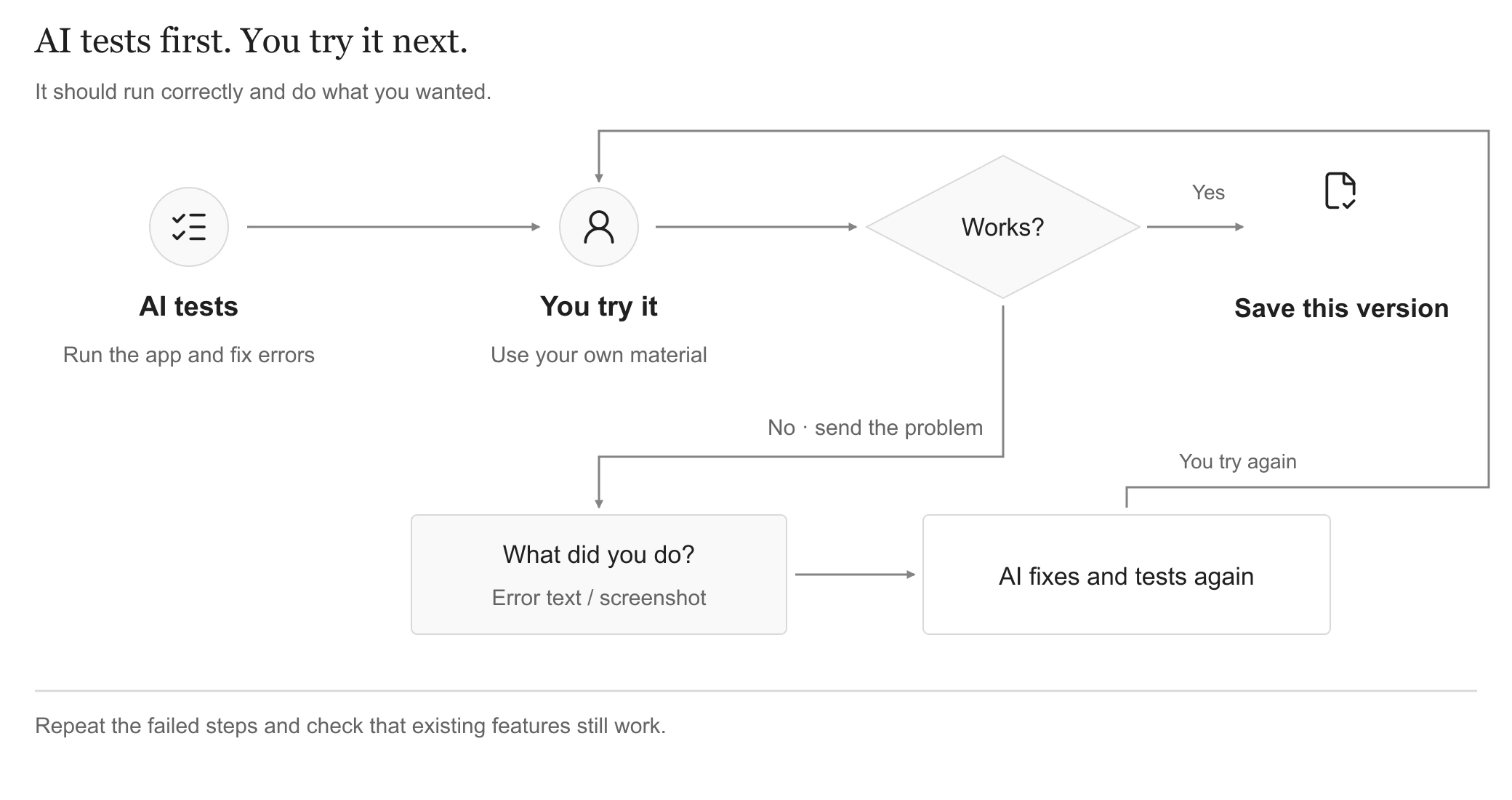
If you find a problem, send it to the AI and repeat the steps after repair. View full-size
Choose material you understand, then:
- Complete a round: paste, generate, answer, and read explanations. Does the source support the answers, or is anything invented?
- Move between views: visit the source and return. Are answers and position preserved?
- Try bad input: what happens with blank material, and can you recover from failure?
- Try a phone-sized screen: can you read the question and reach the buttons?
Paste Errors Into Chat
You do not need to understand an error before asking for help. Paste the error text and explain what you just did. For example:
I pasted material and clicked Generate. It kept spinning, then said “Request failed.” I expected my material to remain, but the input was cleared. Here are the error and screenshot.
Use this template when you need more detail:
No error message is required: long waits, unresponsive buttons, and wrong explanations are valid reports. Remove keys, cookies, and private material from logs and screenshots.
After the AI fixes it, repeat the same steps. Close the issue when the symptom is gone and the previous features still work. After trying your own material, ask a target user to attempt the task independently where possible.
Keep a Progress Note
Ask the AI to record four things: how to start, what works, remaining problems, and the next step. When a conversation grows too long or you switch chats, bring that note, current documents, and code instead of relying on chat memory.
6. Add One Feature Next
With the core working, expand it. Scaling can start small: after a wrong answer, can the learner try one related question?
Before every new feature, commit the existing code first. Confirm that the current features work and commit the previous round of changes to Git before starting the next round. If the extension breaks something, you can return to the version from before it.
Add only “Try another question.” Leave notebooks of mistakes, study plans, and leaderboards for later.
Define the action: after an incorrect answer, a click generates one question from the same material. Preserve the original three questions and answers. Explain insufficient material rather than inventing evidence.
Check both: the new feature works and the old journey still works. Especially try a failed follow-up generation: the original session should remain usable.
After each extension passes its checks, commit the code and update instructions before starting the next one. Extract shared logic when several features repeat the same work, rather than building a large general platform up front.
7. Investigate Growing Demand
Another part of Scaling appears when the app works alone but slows down with several users. Measure where the delay occurs before deciding how to improve it.
Identify the Waiting
A generation request has several moments: the click, the server receiving it, useful content first appearing, and the complete result arriving.
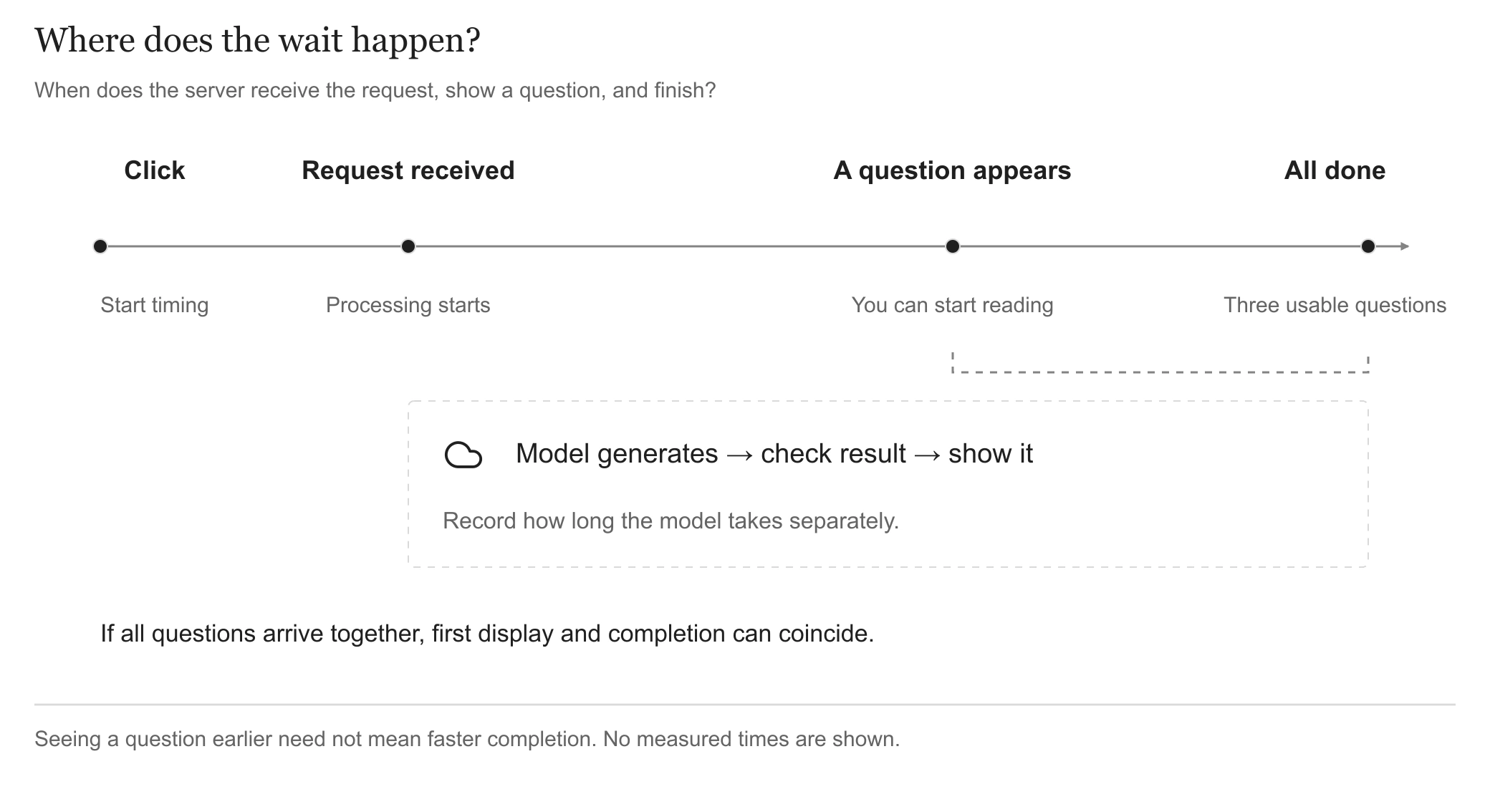
An illustration without measured times. Showing all questions together can make first display and completion coincide. View full-size
This example returns all three questions together, so seeing the first question and completion may coincide. Showing questions progressively can let people start reading earlier without making the whole generation faster.
| Problem | What the AI should investigate |
|---|---|
| Slow even for one person | Is page processing slow, or is it waiting for the model? |
| Fails only with several users | Are simultaneous requests or service limits the cause? |
| One click generates repeatedly | Do duplicate submissions or retries create extra calls and charges? |
| Refresh or restart loses progress | Are questions and task progress stored only in memory? |
Choose a Suitable Fix
- Too many requests: limit active work and queue the rest. A queue schedules turns rather than accelerating each model call; long waits still need feedback.
- Repeated work: consider reusing results, or caching. A duplicate click differs from deliberately asking for fresh questions, and private material must remain isolated.
- Long-running work: a background process can continue while the page displays progress. Surviving a restart also requires saved task state and results; moving work into the background is not enough.
Each mechanism adds development and maintenance. Choose one that addresses the observed problem. Retest with the same material and number of users: did waiting, failures, and costs improve, and did question quality hold up?
Continue into the next chapter when learning records must survive closing the page. For ongoing shared use, Chapter 08 develops background jobs, permissions, and recovery further.
By the end, you should complete a real practice session, know how to get the AI to fix an error, and know how to add the next feature.