The previous chapters turned an idea into a working, deployable product. Sharing it introduces new questions: can someone else see my files? Can a long task survive a closed tab? What happens when many people arrive together? Could a model update make the results worse?
Coding agents can implement much of the software. The builder still needs to know which capabilities are missing, why they matter now, and what would demonstrate that they work. This chapter establishes that map, then turns it into small tasks an agent can deliver.
One teaching example runs throughout: a personal tool that accepts a video and produces a timestamped summary, gradually opening to colleagues, teams, and enterprise customers. These are proposed upgrades, not claims about an existing implementation or a mandatory tool list. Technical references were checked on October 30, 2026.
1. The upgrade map
When you use a tool alone, you know where its files live, can rerun scripts yourself, and may tolerate waiting. Once other people depend on it, the product needs to handle these responsibilities. Start with six questions:
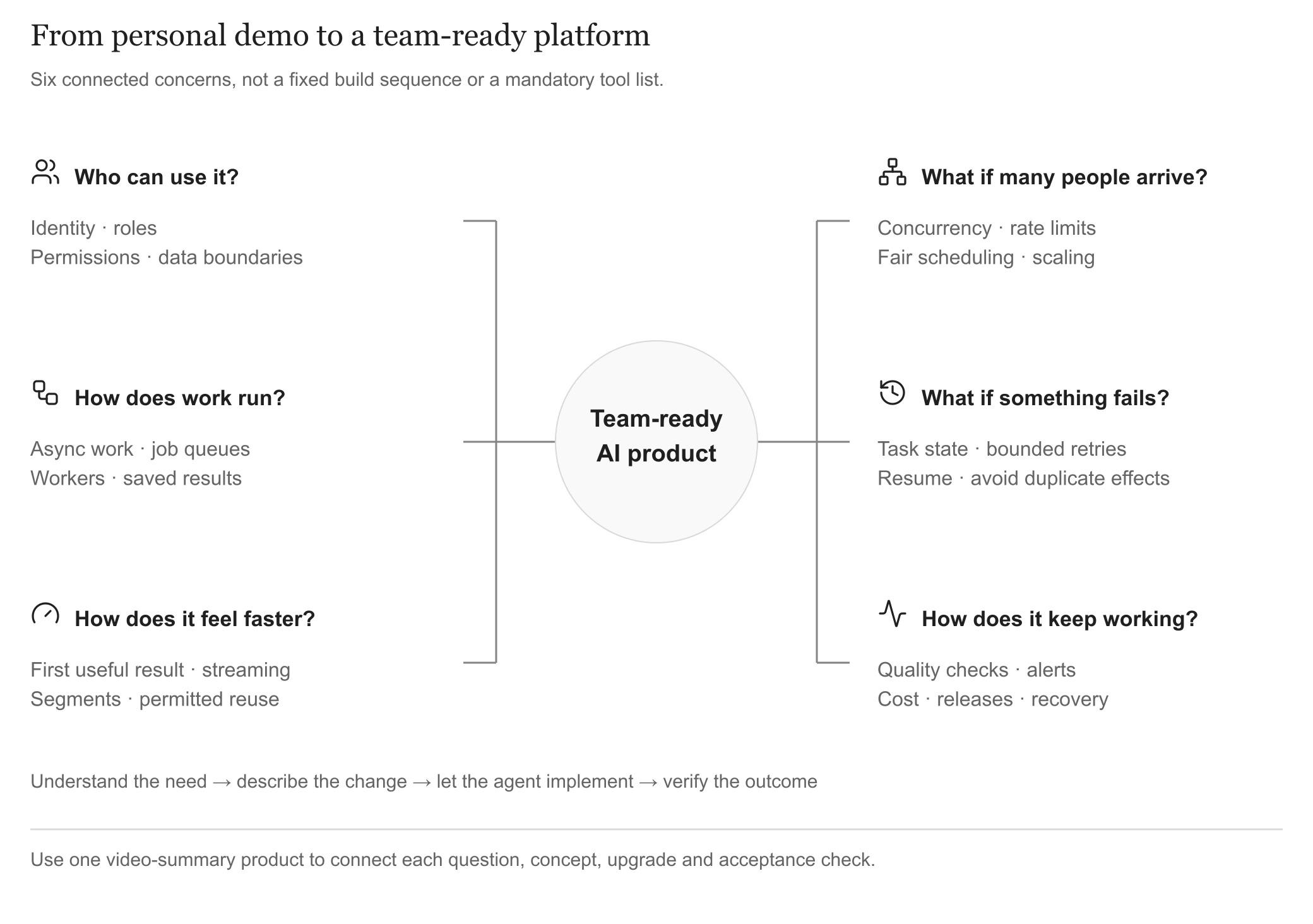
Start with the problem, then learn the concept and choose the next useful upgrade. View full-size
The branches interact. Background tasks need an owner, queues need a scheduling policy, and speed must respect permissions and completeness. This is a capability map to fill in as needs emerge. A production platform can begin with one application, one database, and a few background workers.
2. Identity and permissions
Video case: A uploads an internal meeting; B changes a URL and reads its summary. The missing capability is identity and access management.
Sign-in, roles, and ownership have different jobs:
| Concept | Question and example |
|---|---|
| Authentication | Who are you? Establish which member is signed in |
| Role permissions | What may you do? Members process videos; administrators invite members and manage allowances |
| Resource ownership | Which material may you access? Personal and team-shared videos have distinct scopes |
Access depends on all three. Membership does not grant access to other teams. Whether administrators can read private videos needs a separate rule.
Put the rules into practice in three steps:
- Choose defaults. Are videos private or team-visible? Who may delete, export, invite, or change allowances? Record actions and who may perform them.
- Check each access on the server. Derive ownership from verified identity. Cover videos, transcripts, summaries, search, downloads, and background tasks. Hiding a button cannot stop an API request; database rules add enforcement, as shown in Supabase's row-level security documentation.
- Recheck when access changes. Departed members must lose access through old task identifiers. Finished jobs still follow current permissions. Downloads need expiry and an invalidation strategy; copies already downloaded cannot be automatically reclaimed.
Explain the data lifecycle, too:
- Recipients: which files reach external models or transcription providers?
- Retention: how long do original videos, transcripts, and intermediate files remain?
- Deletion: which summaries, segments, and temporary files are removed with a video?
Acceptance: use two accounts and two teams to attempt cross-account reads, edits, and downloads. Remove a member and check old entry points. Keep secrets on the server; malicious transcript instructions must not expand authority. See OWASP's prompt injection guidance.
3. Background jobs
Video case: closing the page halfway through a long video forces the user to start again. Separate processing from a single web request.
Three concepts explain the change:
- Asynchronous processing: register the task, return a place to follow it, and continue in the background.
- Message queue: hold pending work orders for available workers, usually carrying task identifiers rather than entire videos.
- Worker: a background process that downloads, transcribes, and summarizes.
Here is how they connect to the web service, database, and file storage:
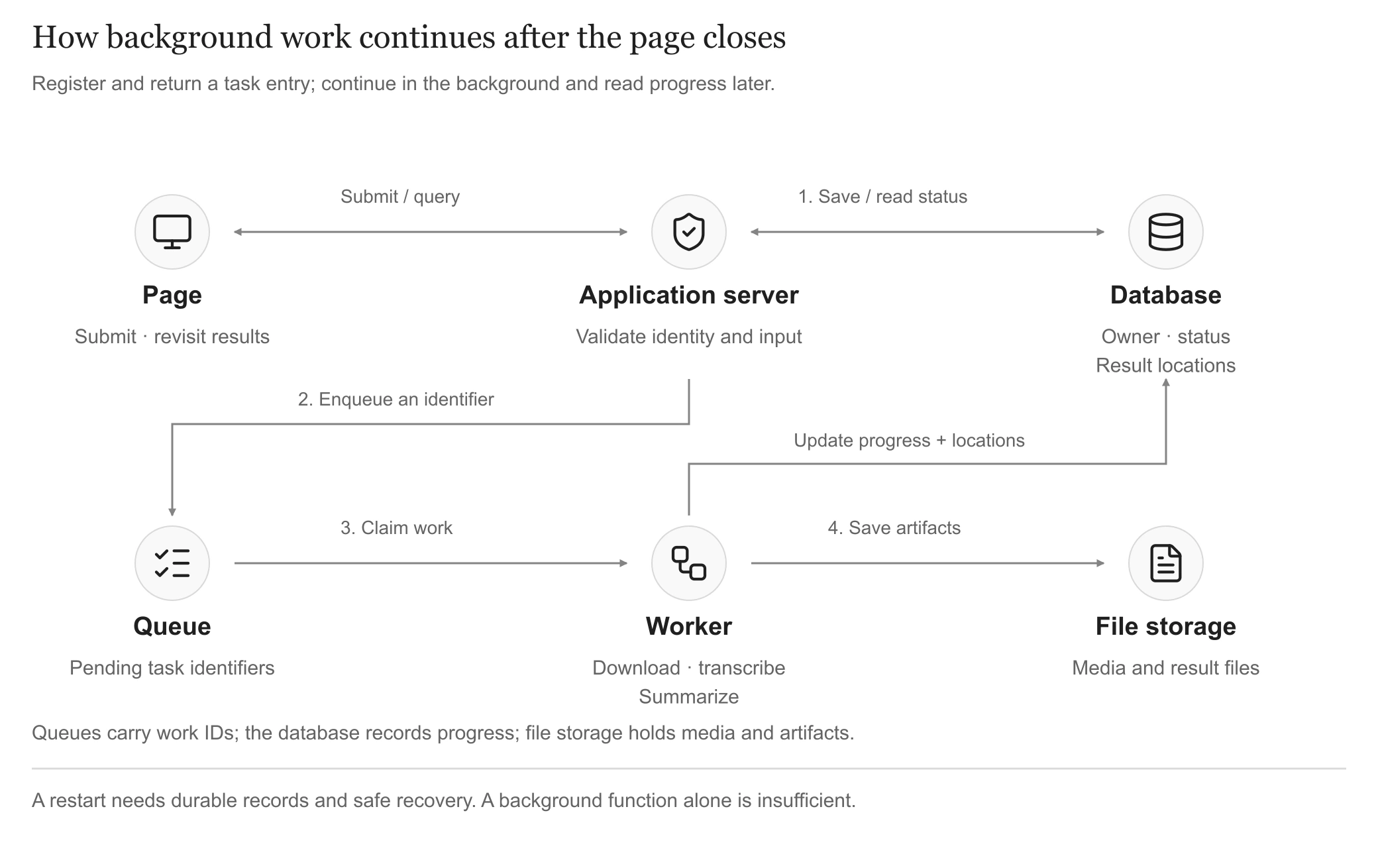
Separate admission from execution; the page reads saved task status and results. View full-size
Make task status truthful and recoverable:
- Database: record the owner, current stage, completed segments, and result locations.
- File storage: keep videos, audio, transcripts, and summary files. The queue signals work to perform.
- Page: read saved status through polling or pushed updates. When a percentage is unreliable, show the stage and completed segment count.
Work can get lost between admission and execution:
- Registered but not queued before a crash: rediscover and enqueue the work.
- Worker exits after claiming it: detect stalled progress and arrange safe takeover; section 6 covers recovery and duplicates.
Define responsibilities before choosing tools. The web service and workers can share one project. Early versions may reuse hosted task services or a database task table with reliable claiming and recovery. Async lets users leave; queues organize waiting; speed still depends on processing capacity.
Acceptance: work survives closing the page; signing back in reveals progress; service restarts preserve registered tasks and saved results.
4. Faster results
Video case: work now runs in the background, but users still wait too long. Establish which wait you want to improve.
Time three moments separately:
- Accepted: acknowledge the task and provide a follow-up location.
- First useful result: show an evidenced transcript or summary segment.
- Complete: finish the required whole-video processing and full summary.
A model's time to first token (TTFT) measures only part of this journey. An early status message or introductory sentence does not establish useful output.
Locate the bottleneck before choosing an intervention. Time uploading or downloading, queueing, transcription, generation, and delivery. A faster generation model may help little when downloading and waiting dominate.
Improve the waiting experience with streaming:
- Display content as it is generated. SSE is one implementation option; see MDN's server-sent events guide.
- Check the entire path. Incremental server output is insufficient when the page displays everything only at the end.
- Support returning. Reconnect to saved task status and results. Losing the page connection should not automatically cancel background work.
Reduce actual work with a segmented video pipeline:
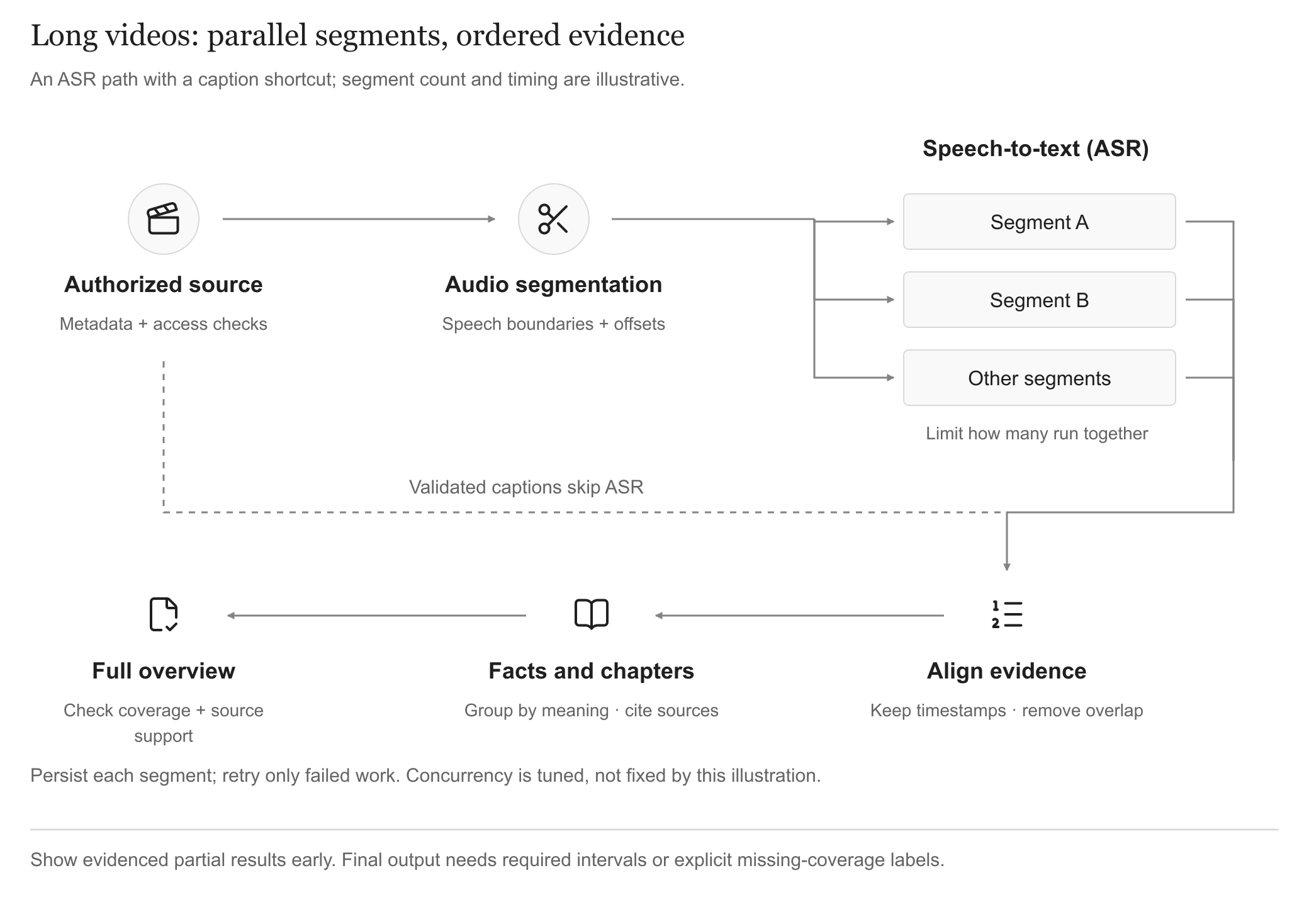
Valid captions take a shorter path. Resume segments independently; publish the full overview after coverage checks. View full-size
- Prefer suitable captions. Authorized, usable captions can skip transcription. Otherwise extract audio and apply automatic speech recognition (ASR).
- Segment with limited parallelism. Retain original time positions and handle boundary overlap and out-of-order completion. Media cuts and semantic chapters differ; see FFmpeg's segment documentation.
- Show evidenced partial results first. For an interview, publish highlights from completed intervals. Label coverage and missing segments explicitly.
- Synthesize globally at the end. Check whole-video coverage, merge repeated points, and connect discussions across segments. Keep important names, numbers, and claims traceable to the source; concatenating segment summaries is insufficient.
Two further opportunities:
- Caching: reuse authorized results for unchanged videos and settings, checking content versions, access, and retention.
- Allocate work appropriately: ordinary code handles cuts, timing, and format checks; models handle interpretation and synthesis. Test lighter-model options on representative examples.
Include essential visuals. Slides, charts, and screen demonstrations may carry meaning absent from speech. Add time-aligned visual analysis when the product requires it.
Acceptance: compare first useful output, full completion, expense, and summary quality together. Segmentation, streaming, or more workers alone cannot demonstrate a speedup.
5. Concurrency and scheduling
Video case: one long video launches every segment request, leaving other people's short clips waiting. This is a concurrency and scheduling problem.
Find which resources are busy:
- Many people viewing lists: primarily web endpoints and database reads; reduce repeated queries and improve data access where needed.
- Many long-video submissions: bandwidth, transcription resources, and model quotas; control background execution.
Concurrency concerns multiple active tasks. Processing several segments simultaneously is one form of parallel work. Both consume shared resources and need coordinated limits.
Control capacity in three steps:
- Rate limits and quotas control admission. Bound submission rates and each person's or team's video minutes, tasks, or spending. Apply appropriate platform, team, and per-video ceilings together.
- Fair scheduling controls resource shares. Limit a task's simultaneous segments so others advance. Duration, size, or estimated cost can distinguish long work from short work, allowing for estimation error.
- Scale after finding the bottleneck. Web instances share incoming requests; workers share background execution. Persist essential state outside individual processes. More workers may only create errors when model quotas are exhausted.
Watch more than queue length:
- Waiting age: is the oldest task permanently stalled?
- Completions: can the system drain work after the peak?
- Bottlenecks: are provider quotas rejecting requests, or is one stage unusually slow?
Explain excessive waits or temporarily decline new work. Preserve capacity for status queries, cancellation, and administrative handling. AWS's queue-backlog article explains capacity and backlog recovery.
Acceptance: mix simultaneous users, long and short inputs, and sustained heavy submissions. Check ordinary users can complete work, long jobs do not crowd out others, waits are understandable, and spending remains bounded. Set targets from measurements.
6. Failure and recovery
Video case: the service restarts after 27 of 30 segments finish. Users expect the remaining work to continue without repeating the whole video's time and expense.
Different failures need different responses:
| Situation | Response and boundary |
|---|---|
| Temporary network failure | Wait and retry within limits. Bound attempts, total duration, and expense |
| Missing permission or unsupported file | Stop and explain the correction. Repeated calls will not repair the input |
| Worker exits or service restarts | Resume from saved progress. Verify artifact integrity and source version first |
| External operation times out with an unknown outcome | Reconcile; hand unresolved cases to a person. Do not repeat a write before establishing what happened |
A timeout does not prove the remote action failed. See AWS's retry guidance. During broad outages, spread retries out, increase delays, and pause calls when needed while preserving recoverable work.
Add three complementary mechanisms:
- Checkpoints preserve completed work. Record source versions, intervals, validation, and artifact locations. A file may be incomplete despite existing. Verify before reuse, including after settings or inputs change.
- Idempotency prevents repeating one operation's effect. Double clicks, resubmission, and repeated delivery must not create two billable jobs. Deliberately changing settings and generating again is a new operation. Enforcement needs records and supporting interfaces.
- Cancellation explains where work stopped. Stopping future scheduling cannot undo external requests or incurred charges. Compensate only where the business and interface support it; unresolved outcomes need human handling.
Reverting code cannot undo external facts. A sent notification or incurred charge does not disappear by rerunning the workflow or rolling back an application version.
Verify by deliberately causing three conditions:
- Interrupt service: completed segments survive and only necessary work resumes.
- Repeat a submission: the same operation does not repeat its business effect.
- Keep a step failing: retries stop within budget, errors are visible, and input correction, retry, or administrator recovery is available.
7. Quality, cost, and operations
Video case: a model update produces smoother prose but misses the latter half of the video. A successful response does not establish a useful result.
Start with five operational responsibilities:
| Responsibility | A small starting point for the video tool |
|---|---|
| Quality evaluation | Keep representative videos; compare facts, coverage, and timestamps before and after changes |
| Logs and alerts | Trace downloading, transcription, and synthesis per task; assign someone to respond |
| Cost | Attribute transcription, models, storage, and retries to a useful completed result |
| Releases | Record code, model, prompt, and processing rules; test with a small group and retain a working version |
| Backup and restore | Cover database and files; practice recovering tasks, permissions, media, and results |
Avoid judging quality by appearance:
- Vary the examples. Include short and long videos, multiple speakers, noise, specialist terms, and visually driven explanations.
- Check observable facts. Names, numbers, and conclusions must be traceable. A summary need not have one exact reference answer.
- Combine code and review. Automate format and flow checks; sample content and calibrate AI grading. Repeat comparisons where outputs vary; see Anthropic's evaluation guidance.
Use costs and run records to answer concrete questions:
- Connect a task's stages: where did it stall, how long did it wait, how many retries ran, and what did it cost? Exclude secrets and unnecessary private content.
- Look beyond averages: long videos, persistent retries, and heavy users can drive disproportionate expense.
- Enforce budgets throughout: check size and allowances before admission, limit execution spending, and clean up unneeded artifacts afterward.
Give maintenance an owner and a process:
- Start with a task-management entry point. Find failures and costs by identifier; retry or cancel within access rules; retain administrator action records.
- Practice releases and recovery. Progress from test environments to limited users. Restore a selected task separately, checking permissions, usable files, and source traceability.
- State the service arrangements. Identify who handles failures and expected response times, how organizations manage members, and the scope and completion of export and deletion.
Acceptance: detect quality regressions, locate failed tasks, explain spending, restore data, and give users a responsible contact. Administration can grow with usage.
8. Upgrade priorities
Use the map to find omissions, then prioritize. The following stages illustrate one path; basic permissions and data protection matter from the first shared release.
| Current stage | Prioritize | Observable result |
|---|---|---|
| From personal use to colleagues | Sign-in, resource ownership, saved results, failure messages, basic quotas and backups | Others can use it independently without crossing account boundaries |
| Long-video use | Background jobs, status, segments, partial results, recovery | Closing a page preserves work; failures preserve completed progress |
| Wider adoption | Queue scheduling, limits, load checks, monitoring and alerts | Multiple users remain manageable; long tasks do not continually crowd out others |
| Enterprise customers | Required organization controls, single sign-on, audit, data policies, release and recovery procedures | Customers can govern access; maintainers can support an ongoing service |
Choose the most consequential current problem and complete its path across interface, server, and storage before moving on. One application can host these capabilities. Microservices, additional agents, and complex infrastructure need a concrete problem and supporting evidence. Anthropic's architecture guidance likewise recommends starting simply and adding complexity as tasks require it.
9. Assign the agent a task
The map turns “make this enterprise-grade” into a specific request: “keep processing after the tab closes, and let me return to progress and results.” You establish users, priorities, access boundaries, and acceptable outcomes. The agent can inspect the implementation, explain gaps, change code, and execute checks.
This prompt asks the agent to locate gaps, then implement one selected upgrade. Fill in the project's actual context; leave unmeasured targets explicitly unresolved.
After delivering one upgrade, return to the map and choose the next. The task records, access rules, evaluation examples, and operational evidence accumulated along the way make each subsequent agent assignment more precise and easier to review.