💡 Time-Sensitivity & Context (Written: September 21, 2026)
AI tooling evolves rapidly. Many earlier tutorials reference outdated model releases, while developers often face friction with overseas proxies and credit card verification. This note outlines a calm, practical foundation: selecting reliable models, choosing a comfortable coding agent, and setting up guardrails before writing code.
Start with the responsibilities across the development environment: you define the goal and acceptance criteria; the agent coordinates work; models, tools, and runtimes provide different capabilities. The diagram is an overview of the article. The sections below cover runtimes, models, coding tools, MCP, Skills, and project rules in turn.
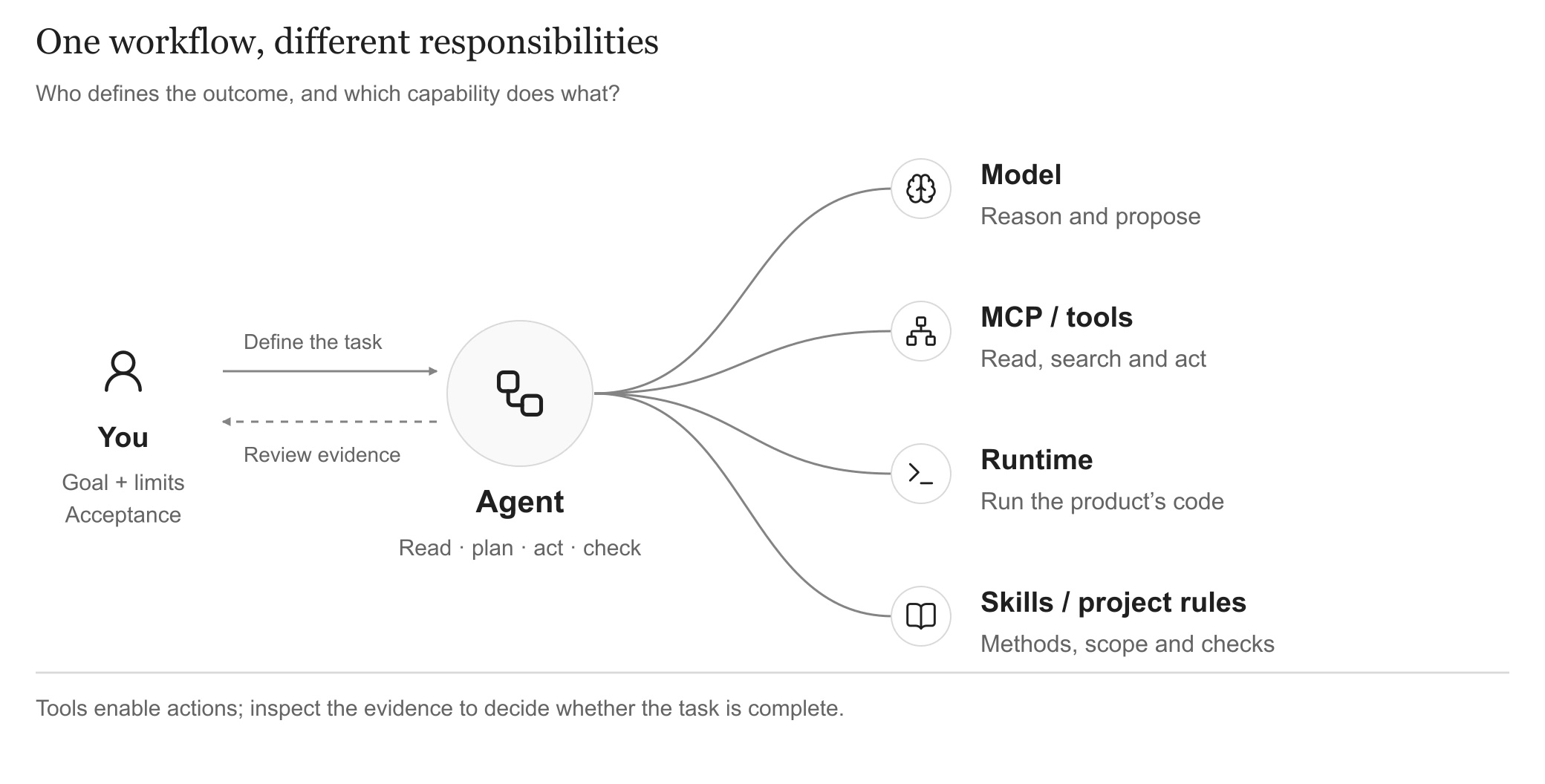
Models reason; agents coordinate; tools act; project rules constrain the work. Open full-size diagram
1. Configure the Runtimes Your Project Needs
Node.js supports web interfaces and tooling; Python is useful when the product needs its libraries or processing workflows. Configure the runtimes your project actually uses.
- Node.js (Frontend & Tooling Host): Handles user interfaces (React, Next.js), frontend build tooling, and hosts Model Context Protocol (MCP) servers that connect external documentation and browser automation to your AI.
node -v # Check installation (v20+ LTS recommended)
npm -v
- Python (Backend Logic & Model Orchestration): Dispatches calls to LLM APIs (DeepSeek, Claude, OpenAI), manages database logic, and processes analytical workflows behind clean JSON contracts.
python --version # Check installation (3.11+ recommended)
pip --version
Keep interface and processing responsibilities clear, even when they live in one application.
2. Mainstream Foundation Models: Overview & Selection
Different models excel at distinct tasks—some specialize in multi-file refactoring, while others offer vast context windows or friction-free local payment. Here is an objective comparison of mainstream options:
Mainstream Model Comparison
| Model Family | Key Strengths & Typical Scenarios | Cost Reference |
|---|---|---|
| Claude (Sonnet / Fable 5.1) (Anthropic) | High logical rigor, dependable instruction-following, and excellent multi-file refactoring. Sonnet is the balanced daily workhorse, while Fable handles long-horizon autonomous tasks. | Pay-per-token API (approx. $3-$15/M tokens) or $20/month subscription. |
| GPT (GPT-5.6 Sol / GPT-6 Astra) (OpenAI) | Broad generalist capabilities and fast response times. Sol is a popular everyday coding driver; Astra adds browser and computer-use automation with a 1M context window. | Pay-per-token API or $20/month Plus/Pro subscription. |
| Gemini (Gemini 3.8 Flash / Pro) (Google) | Vast native context window (2M tokens) with configurable reasoning depth. Excels at analyzing entire repositories or multi-modal specs in one shot. | Generous free tier via Google AI Studio; low pay-per-token API pricing. |
| DeepSeek (V4-Pro / V4.1) (DeepSeek) | High-quality coding intelligence comparable to frontier models, with minimal hallucinations and high accuracy on standard engineering tasks. | Extremely low cost (approx. $0.14-$0.28/M tokens; a few dollars cover extensive usage). |
| Qwen (Qwen3.8-Max / 27B) (Alibaba) | Strong bilingual comprehension. The 27B open weights can run completely offline on consumer GPUs (e.g. RTX 4090 or Mac Studio) with zero data leak risks. | Inexpensive cloud API with free trial quotas; $0 running cost when self-hosting open weights. |
| Kimi (K3 / K2.7 Code) (Moonshot AI) | High-capacity context (1M tokens) with strong PRD comprehension. Maintains reliable instruction tracking across multi-turn exchanges without degradation. | Inexpensive pay-per-token pricing with free initial trial balance. |
| GLM (GLM-5.3 / CodeGeeX) (Zhipu AI) | High throughput speed, tailored for Chinese developer workflows. Offers rapid inline completions and bilingual documentation generation. | Free tier available for basic models; low-cost commercial API. |
3. Mainstream Coding Agents: Comparison & Practical Pairings
Choose a comfortable way to work with the model: an AI editor, an extension, or a terminal agent.
Mainstream Coding Agent Comparison
| Coding Agent / Tool | Key Strengths & Typical Scenarios | Cost Reference |
|---|---|---|
| Cursor | Benchmark AI-native IDE with polished ergonomics. Features instant Tab multi-line predictions and fluid multi-file Composer editing for day-to-day coding velocity. | Free basic tier; Pro subscription is $20/month. |
| Trae (ByteDance) | Turnkey AI-native IDE built on standard VS Code ergonomics. Direct connection without proxy hurdles; offers native workspace generation and chat editing. | Free trial access; simple domestic account sign-in. |
| VS Code + GitHub Copilot | Official Microsoft & GitHub integration. Dependable inline code completion, stable model toggling, and reliable billing with domestic dual-currency credit cards. | $10/month for individual developers. |
| Claude Code (Anthropic) | Anthropic's official terminal CLI agent. Excels at autonomous repo-wide refactoring, running shell commands, executing test suites, and handling Git workflows via natural language. | Tool is free & open; billed per actual Claude API token usage. |
| VS Code + Cline / Roo Code | Highly autonomous open-source agent extension. Pure BYOK (Bring Your Own Key) architecture; connects flexibly to DeepSeek, Qwen, or global APIs with full transparency. | Extension is 100% free; users pay only for consumed API tokens. |
| Kiro (AWS) | AWS's spec-driven agentic coding platform & IDE. Focuses on formalizing task specs and architecture plans before autonomous agent execution, with multi-step test verification and native MCP support. | Free preview/tier available; AWS account integration with usage-based billing. |
Practical Stacks & Pairing Advice:
- Can you sign in and finish one representative task?
- Can you inspect tool access, changes, and test results?
- Do the cost and workflow fit your routine? Start with one setup and expand when needed.
4. Extending External Tooling: MCP Tools
Model Context Protocol (MCP) connects an agent to external tools and data. Add access when a task needs current documentation, repository information, or browser checks.
An AI application (Host) uses an internal MCP client to communicate with a server that exposes its supported tools, resources, or prompts. The diagram shows example connections; documentation, website content, and browser actions are the examples listed below. See the official MCP architecture for the role definitions.
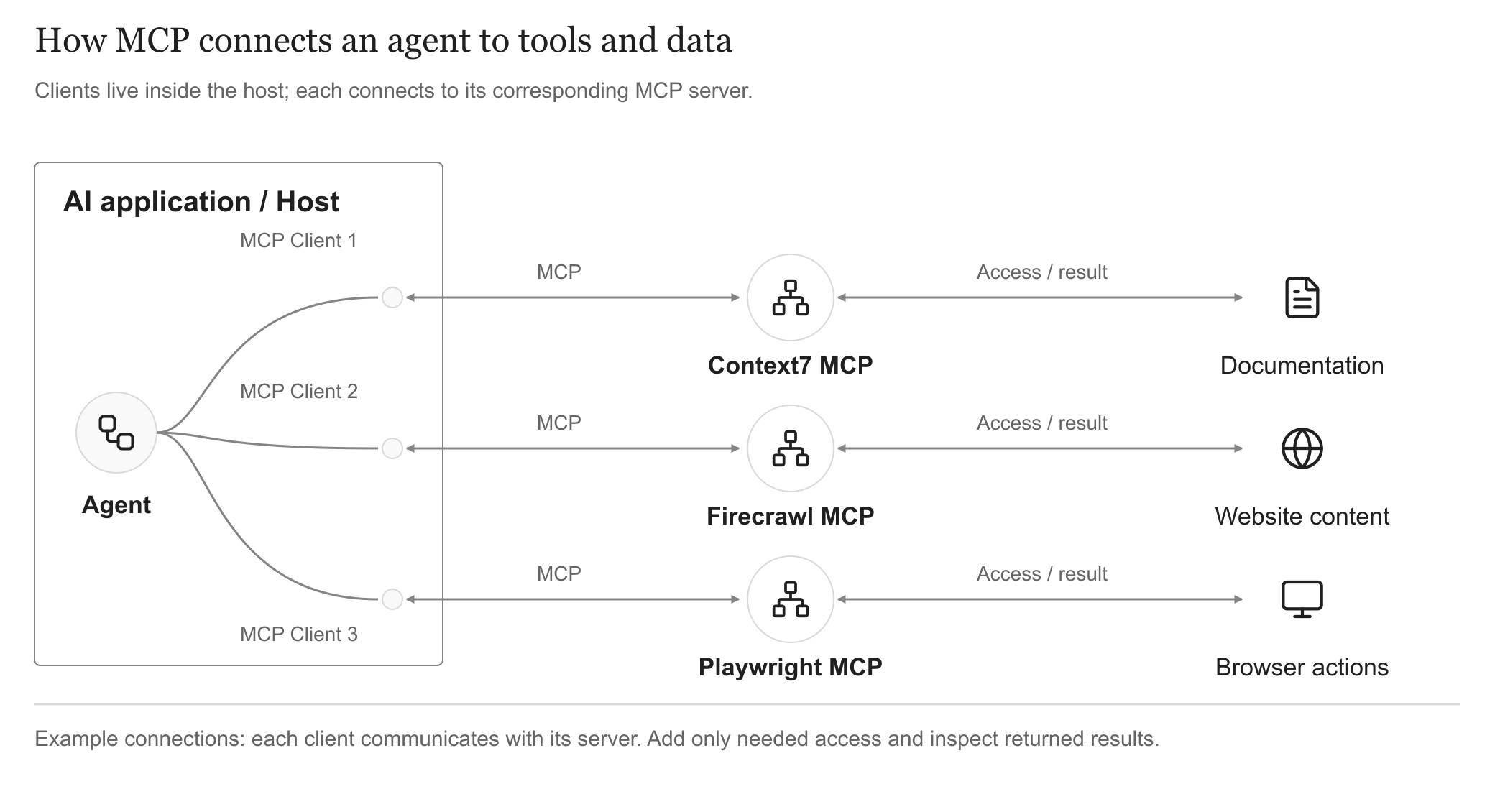
The host connects each MCP client to its corresponding server; add only the capabilities a task needs. Open full-size diagram
Recommended MCP Tools
- Context7 MCP (Live Official Docs): Injects live, version-accurate documentation so models avoid deprecated APIs.
- Firecrawl MCP (Web Cleaner): Scrapes arbitrary technical docs or GitHub repositories and converts them into pristine Markdown for model context.
- Playwright MCP (Browser Automation): Enables the agent to launch a browser, automate clicks, and take screenshots for visual layout verification. (Note: Several modern coding agents like Trae and Cursor now integrate native browser previews, making an external Playwright MCP optional in those setups).
Discovering MCPs for Your Stack: The Model Context Protocol (MCP) ecosystem is open and modular. Depending on your tech stack, you can plug in Supabase MCP for instant database schema queries, GitHub MCP for pull request management, or custom enterprise services—connecting tools on demand without bloating your environment.
5. Injecting Domain Craftsmanship: Agent Skills Ecosystem
Agent Skills provide reusable instructions and methods for carrying out a task. MCP supplies tool access; a skill describes a way to work.
Use skills where their workflow fits the task, alongside the project’s own rules.
Recommended Agent Skills
Using npx skills add and the open-source registry The Agent Skills Directory, you can inject battle-tested design and architectural heuristics into your environment with a single command. The following three packages are recommended as your initial foundation:
-
trellis(Structured Task Scaffold): Enforces disciplined planning before coding. The agent outlines a step-by-step task tree and validates each milestone before advancing, preventing chaotic multi-file mistakes. Official repo: mindfold-ai/Trellis (site: trytrellis.app).npx skills add trellis
-
frontend-design(Anthropic Design Philosophy): Authored by Anthropic to cure "AI slop." It guides the model to adopt a Design Lead's mindset: crafting bespoke typography, cohesive CSS variable palettes, balanced whitespace, and subtle micro-interactions.npx skills add https://github.com/anthropics/skills --skill frontend-design
-
ui-ux-pro-max-skill(UI/UX Best Practices): An open-source knowledge base (nextlevelbuilder/ui-ux-pro-max-skill) of design styles, color palettes, and component guidelines across React, Next.js, and Tailwind to give generated interfaces a refined, professional finish.npx skills add nextlevelbuilder/ui-ux-pro-max-skill
Find additional skills in The Agent Skills Directory when a task calls for them.
6. Establishing Ground Rules: The Agent Harness
Once tools are ready, make the project’s change boundaries and working conventions explicit. Here, the agent harness consists of readable project rules and checks around execution.
Before writing feature code, establish clear constraints in a .cursorrules or AGENTS.md file:
- Limit code changes strictly to the task scope;
- Require the model to present an execution plan for review before modifying files;
- Adhere to the established repository design tokens and avoid unapproved dependencies.
Have the agent read these rules before acting, resolve conflicts or gaps, and work within the agreed scope. At delivery, inspect the diff and relevant verification evidence.
Detailed implementation workflows—from product scoping (Step 02) and API contracts (Step 03) to iterative debugging (Steps 04 & 05) and deployment (Step 06)—will be unpacked step-by-step in the subsequent chapters.